
To clear your browser’s cache, press Ctrl + Shift + Del, selecting All Time in the Time Range, then close and Restart your browser. For full details see below.
Clearing your Web Browser Cache if using:
What is the Cache?
As you use applications, they start storing files for (easier, quicker) retrieval later. These files are stored in the browser’s cache.
If you have saved the wrong password in a website or if a website is updated, you may need to push the change by clearing your cache.
Your browser may cache a copy of a file and we edit or update our version of that file your browser may keep serving the old (cached) version, meaning you won’t see the most recent changes.
This can result in odd behaviours like…
- run-time errors
- buttons missing on the page
- the action you performed doesn’t respond as expected
- etc.
Clearing the Cache and Cookies in a browser helps fix these issues and ensure new features and bug fixes regularly released by the developers are ‘read’ by the application (as compared to using all of the old settings).
The following instructions may help with some of these issues.
1. Google Chrome
- Click the Tools button
 in the top right corner.
 - Select Clear Browsing Data (or click Ctrl + Shift + Del)
The following screen will appear in a new tab:
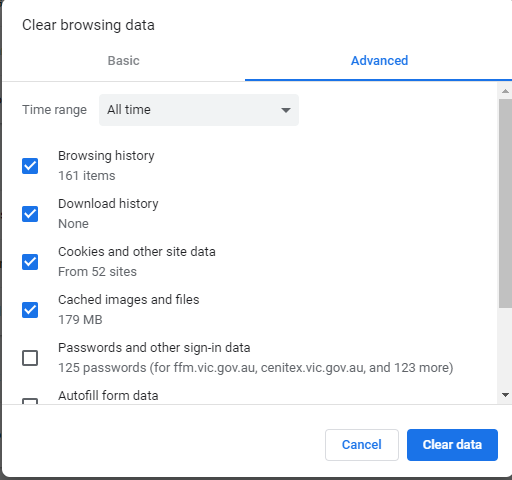
- Select All Time in the Time Range
- Click Clear data
- Close Chrome and restart.
2. Microsoft Edge
- Select Menu (3 dots icon on top right corner of the browser) > Settings > Privacy, search and services (in the left panel).
- Under the Clear browsing data section, click “Choose what to clear“.
- From the drop down list under Time Range, select All Time
- Select “Cached images and files” and “Cookies and other site data” check box.
- Click “Clear now“.
- Close Edge and restart.
3. Safari (iPad, Apple)
- Go to the Settings menu.
- Go to the Safari tab.
- Select Clear History and Website Data.